
Send kakao

When issuing an electronic certificate, it is sent only to customers who have consented to receive notifications via the Kakao transmission service; for customers who do not use or have blocked KakaoTalk, it is sent via standard text message.
-
 KakaoTalk Receipt
Certificate sent via KakaoTalk
-
 Identity Verification
Securely verified with an authentication code
-
 Easy Download
Save the electronic certificate instantly
-
 Mobile Access
View instantly in the app of your choice
How to use Kakao's sending service
-
STEP 1
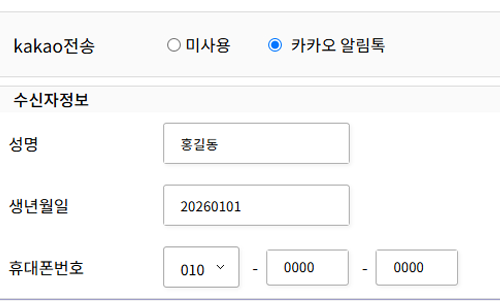
Select Kakao Notification Talk and enter recipient information to request Kakao delivery.
-
STEP 2

Receive an electronic document arrival notification via KakaoTalk.
-
STEP 3
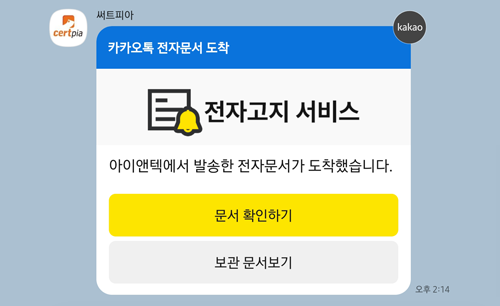
In the received notification, select the Check Document button.
-
STEP 4
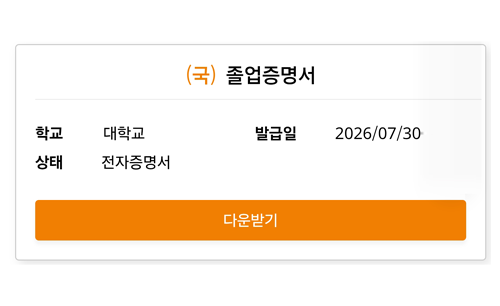
On the received document page, select the Download button.
-
STEP 5
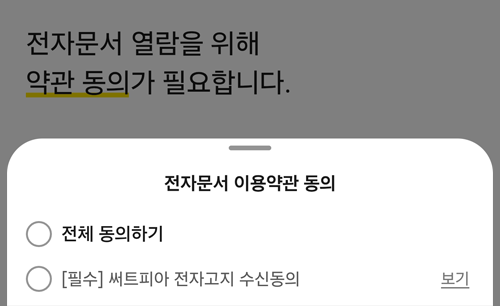
Agree to the Terms of Use to view the electronic document.
-
STEP 6
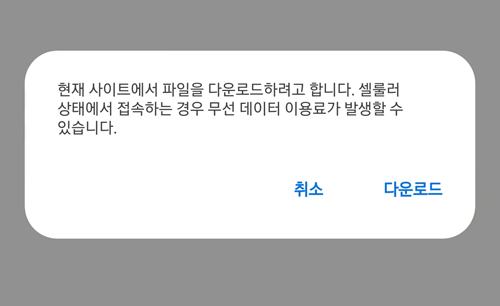
In the download prompt, select Download.
-
STEP 7
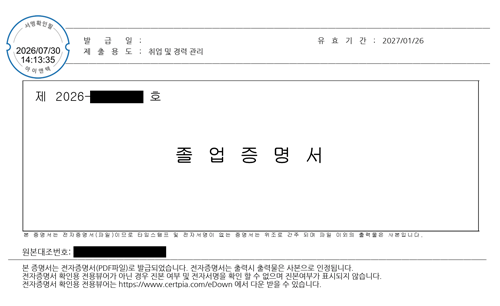
Check the downloaded received document.
How to Use on Mobile
Guides you through the process from app download to certificate issuance and storage.
-
 ① App Download & Login
Install the app and log in
-
 ② School Registration/Selection
Register or select your school
-
 ③ Certificate Issuance
Select the certificate to issue
-
 ④ Payment
Pay the issuance fee
-
 ⑤ Certificate Archive
Check the issued certificate
-
⑥ Kakao
Send certificate via Kakao
*The Kakao delivery service is sent only to customers who have consented to receive Kakao transmissions when an electronic certificate is issued; customers who do not use or have blocked KakaoTalk will receive a standard text message instead.